Where do the colours in Webb's infrared images come from?
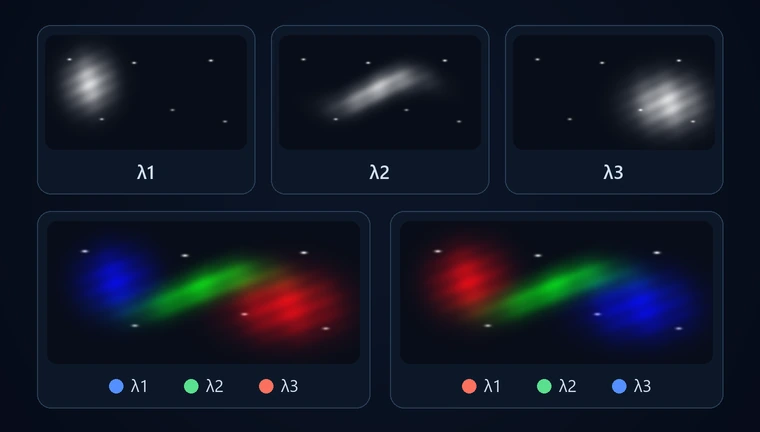
Start with three greyscale images. Give each a display colour, then swap two colours and see what changes.
Start with a picture of one band
Webb's infrared cameras can make multiple images of the same field with different filters. A filter lets through a range of wavelengths. One greyscale image can show where that band was bright or faint after processing. Another band may reveal a different edge, knot or star in the same field.
Assign colours before combining
Image processors align the exposures so that the same point on the sky falls at the same place in each layer. A common scheme uses blue for shorter infrared wavelengths, green for intermediate ones and red for longer ones among the filters used in that composite. Adjustments to contrast can bring out faint structures, so a published pixel colour depends on both the filters and the processing.
Read an actual Webb colour key
Find the colour key on NASA's compass-labelled Carina Nebula jet image linked below. In that composite, blue is 1.87 micrometres (F187N), green is 4.44 (F444W) and red is 4.7 (F470N). Now compare the Cat's Paw Nebula image, where the same F187N filter is shown in cyan. The key tells you which wavelength bands contribute. To identify a material, astronomers look for evidence such as emission or absorption features at characteristic wavelengths.
Swap two channels yourself
Use the illustration as a map. Its three greyscale panels show a patch on the left, a narrow ridge in the middle and a patch on the right. In a drawing app with an RGB colour picker, enter RGB (30, 80, 220) for a synthetic pixel whose short, middle and long bands have intensities 220, 80 and 30. Swap the short and long assignments and enter RGB (220, 80, 30). The pixel turns from blue to orange while the three input values and its position stay the same. The illustration uses synthetic data.